Once you submit an application for a new PAN card or request a correction or update to your existing PAN card, the next thing you may wonder is: When will my application be processed, and when will I receive my PAN card?
The status of your PAN application is generally communicated through SMS and email. However, if you miss these notifications or simply want to manually check the progress of your application, you can track your PAN application status online.
Table of Contents
Track PAN Card Application Status Online
The PAN Card application status can be tracked online through the official website of the service provider through which you submitted your application.
In India, PAN applications for new PAN cards and corrections or changes to existing PAN cards can be submitted through service providers such as UTIITSL and Protean.
Therefore, the process of checking your PAN application status depends on which service provider you used when submitting your application.
If You Applied Through Protean
If you submitted your PAN application through Protean, you can check its status online using the acknowledgement number generated when you submitted the application.
Visit the Protean PAN application status tracking page https://tin.tin.proteantech.in/pantan/StatusTrack.html
On the status tracking page, follow these steps:
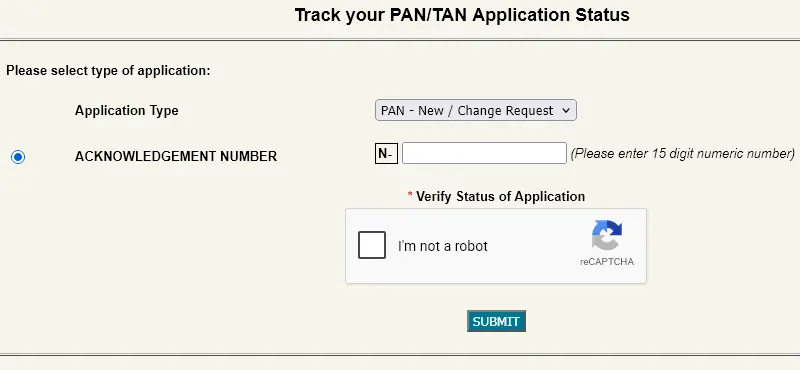
Under Application Type, select PAN – New/Change Request. If you are checking a TAN application, select the appropriate TAN option.
Enter the Acknowledgement Number that was generated when you submitted your application.
Complete the reCAPTCHA verification displayed on the page.
Click the Submit button.
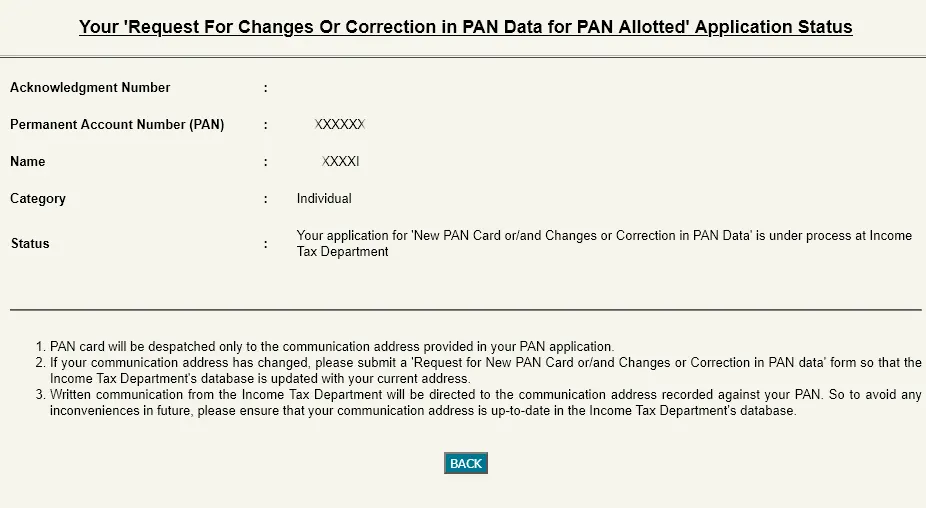
The portal will then display the available status of your PAN application.
Alternatively PAN applications applied through Protean can also be tracked through SMS by sending SMS PTNPAN15 digit acknowledgment no. to 57575.
If You Applied Through UTIITSL
If you submitted your PAN application through UTIITSL, you can check the application status through the UTIITSL PAN tracking page.
Visit https://www.trackpan.utiitsl.com/PANONLINE/forms/TrackPan/trackApp
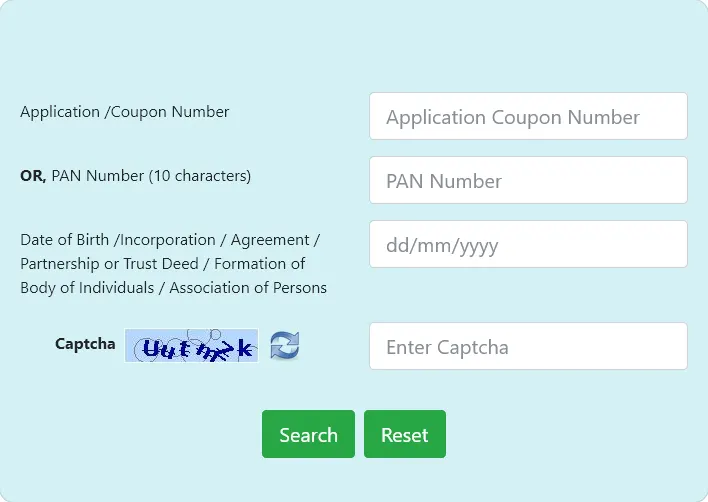
On the UTIITSL tracking page, you can track your PAN application using either your Application Coupon Number or PAN Number.
Follow these steps:
Enter your Application Coupon Number or PAN Number. You need to enter either one of these details.
Enter your Date of Birth.
Enter the security code shown in the CAPTCHA.
Click the Search button.
The website will then display the current status of your PAN application.

Leave a Reply