Form I & XIV is one of the most important land record documents in Goa. It is commonly referred to as the Record of Rights (RoR) and contains complete ownership and land details.
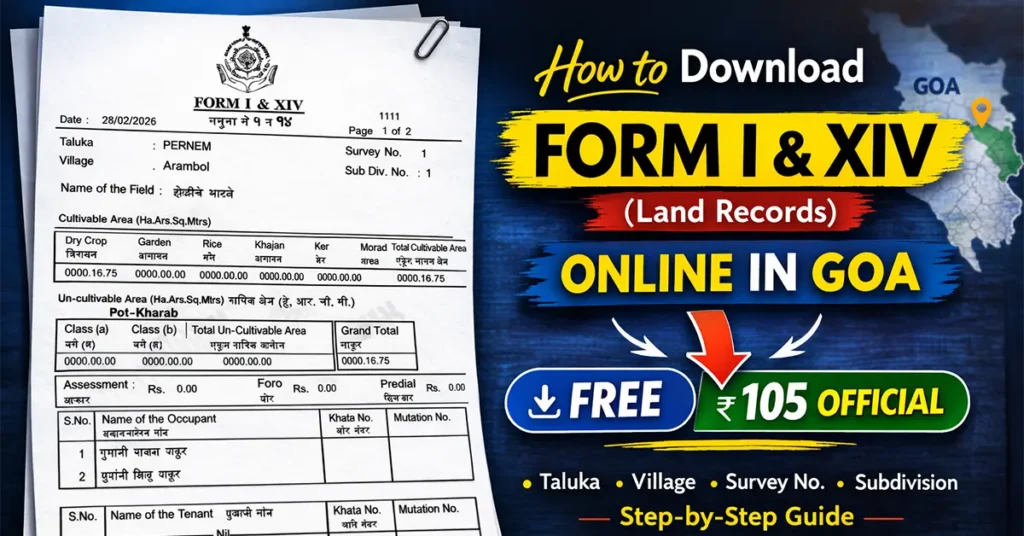
This document is required for several purposes such as Verifying land ownership, Checking updated land records, Partition of land, Applying for change of zone, Property transactions, Legal and revenue-related matters, etc.
Form I & XIV does not remain the same permanently. It may change due to Addition of new landowners, Removal of names due to partition, Mutation entries or Change in tenancy details.
Therefore, keeping an updated copy helps you verify the latest ownership and land details.
Table of Contents
What Details Does Form I & XIV Contain?
Before downloading, it is important to understand what information this document includes.
Form I & XIV typically contains:
| Survey Number of the land | Uncultivable Area Details |
| Subdivision Number (Hissa Number) | Name of Occupants |
| Name of the Field | Name of Tenant (if applicable) |
| Taluka | Khata Number |
| Village Name | Mutation Number |
| Cultivable Area Details | Other land-related remarks |
Ways to Download Form I & XIV in Goa
There are two main ways to obtain Form I & XIV:
- Free Copy (For Information Purpose Only)
- Official Digitally Signed Copy (Paid – For Legal/Official Use)
In this article, we will explain both methods step-by-step.
How to Download Form I & XIV for Free
You can download or view Form I & XIV for free using two methods:
- Through the DSLR Goa Website
- Through the Goa Online Portal
Both provide land details for reference purposes only.
Method 1: Download Form I & XIV from DSLR Goa (Free PDF Copy)
You can download a free PDF copy from the official DSLR website.
Visit the official DSLR website https://dslr.goa.gov.in/
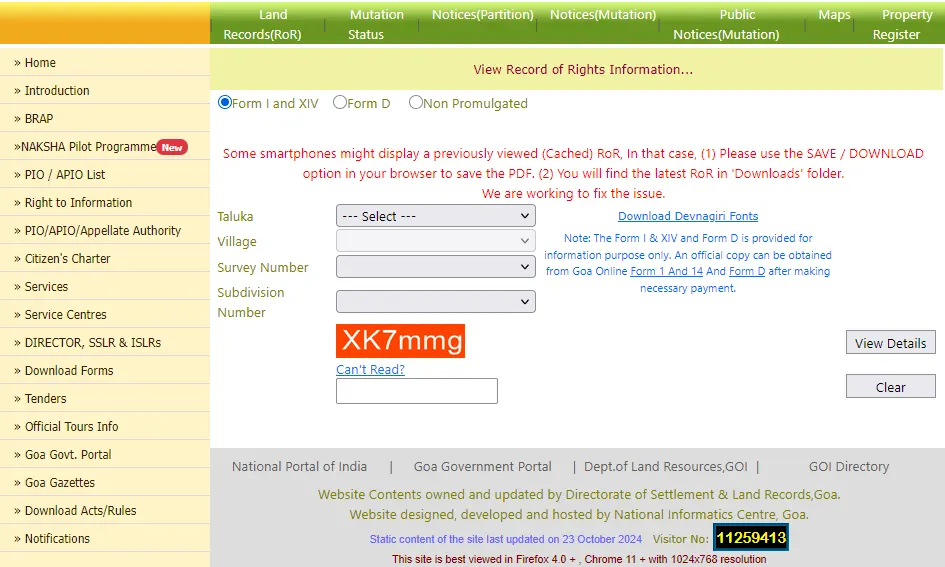
On the homepage, click on Land Records (RoR).
You will be redirected to the Form I & XIV search page.
Select the following details:
- Taluka
- Village
- Survey Number
- Subdivision Number
Enter the Captcha Security Code.
Click on View Details.
The Form I & XIV PDF will open in your browser.
Click on the Save/Download button from the top menu to download the PDF to your device.
This free copy will contain a watermark stating that it is for information purposes only and cannot be used for official or legal submissions.
Now you have successfully downloaded Form I & XIV for reference purposes.
Method 2: View Form I & XIV from Goa Online Portal (Free Viewing Only)
You can also view land details through the Goa Online portal.
Visit the official Goa Online Portal https://goaonline.gov.in/
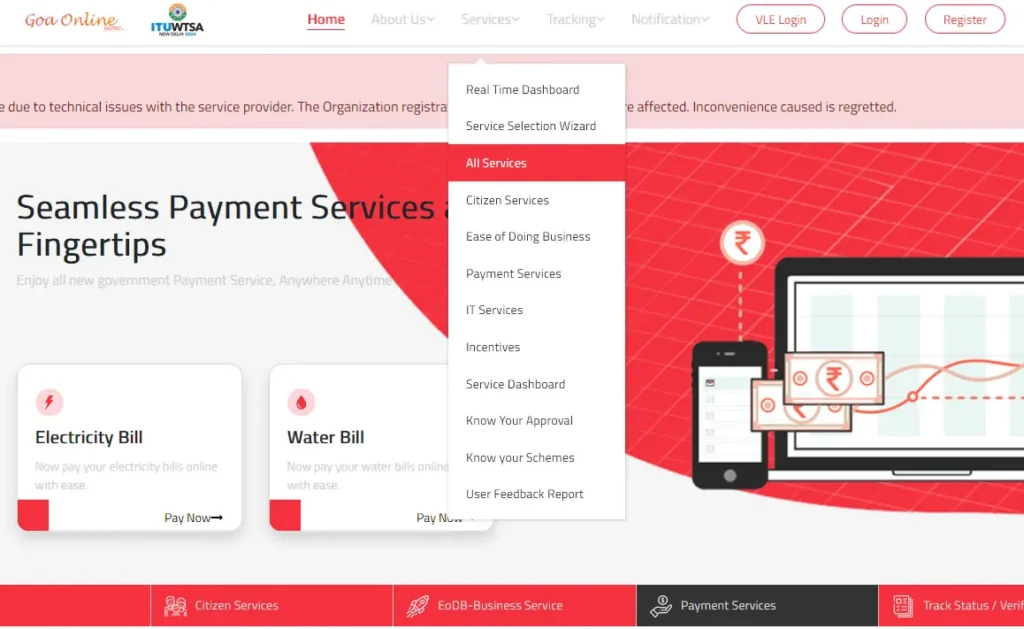
On the homepage, click on All Services under the Services section.
Scroll down to the Revenue Section.
Click on More under Revenue.
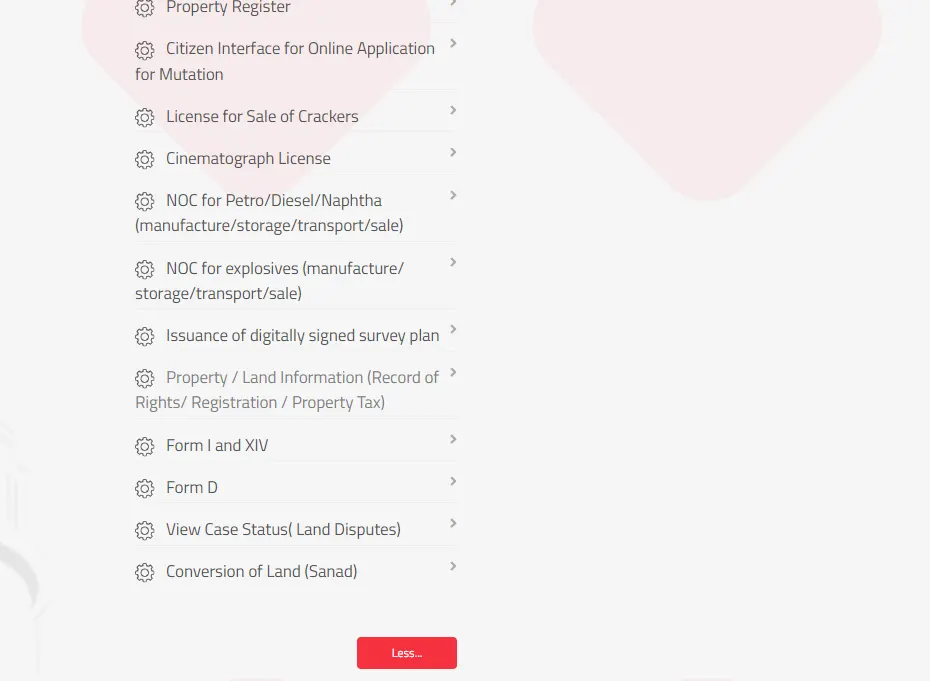
Select Property / Land Information (Record of Rights / Registration / Property Tax).
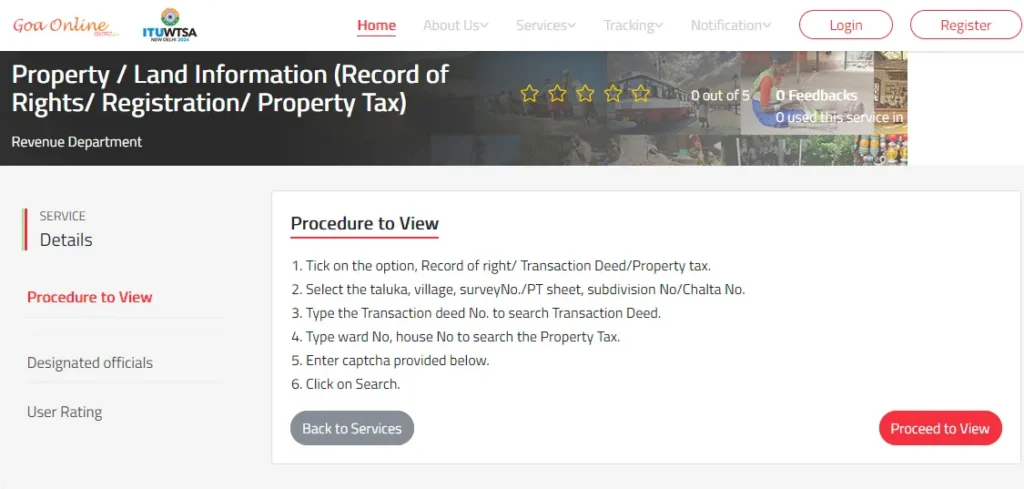
Click on Proceed to View.
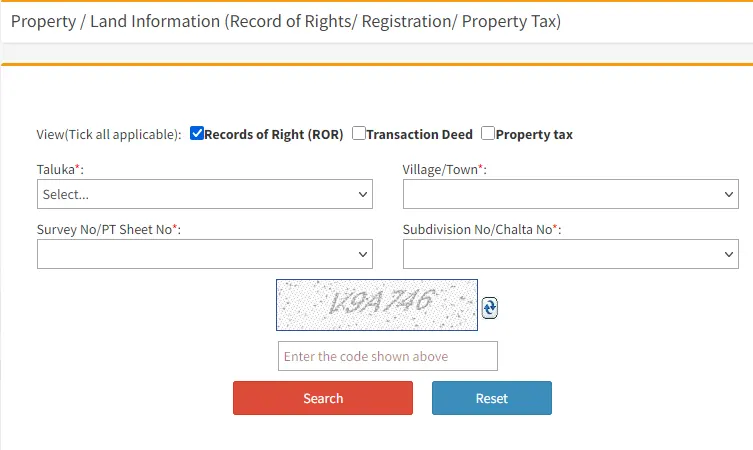
By default, “Record of Right (ROR)” will be selected.
Enter the following details:
- Taluka
- Village/Town
- Survey Number
- Sub Division Number / Chalta Number
Solve the Captcha Security Code.
Click on Search.
The Form I & XIV details will be displayed on the screen.
Using this method, you can only view the details online. You cannot download a PDF copy through this method.
How to Download Form I & XIV for Official Purpose (Digitally Signed Copy)
If you require Form I & XIV for:
- Partition of land
- Change of zone
- Court matters
- Legal documentation
- Submission to government departments
You must download a digitally signed official copy through the Goa Online Portal by paying the prescribed fee.
Visit https://goaonline.gov.in/
Register an account if you do not already have one.
If already registered, log in using your credentials.
After logging in, click on All Services under Services.
Scroll down to the Revenue Section.
Click on More.
Select Form I & XIV.
Click on Proceed to Apply.
An application form will open.
Your profile details such as Applicant Name, Mobile Number, Email ID will automatically be populated.
You need to select:
- District
- Taluka
- Village/Town
- Survey Number / PT Sheet Number
- Sub Division Number / Chalta Number
Enter the Captcha Security Code.
Click on Preview if you want to view the document before making payment.
The preview document shown will still be for informational purposes only.
To download the official copy:
Click on Pay and Apply for Digitally Signed Copy.
A confirmation page will display your Acknowledgement Number, Applicant Details and Payment Amount
The payable amount is ₹105 per document.
Click on Proceed to Pay.
A disclaimer popup will appear click OK.
On the e-Challan gateway page Solve the Captcha, Select the payment gateway
Click on Initiate Payment
Make the payment using any available online payment method.
After successful payment:
An e-Receipt will be generated.
You can download the payment receipt for future reference.
Click on Go to Department Website.
You will see: Acknowledgement Number, Payment Receipt and Download Form I & XIV link
Click on Download Form I & XIV to download the digitally signed PDF file.
If you do not download immediately:
Login to Goa Online Portal.
Go to Inbox > Applications.
Find your Form I & XIV application.
Click on the arrow beside the application.
Click on Download to get your official copy.
Form I & XIV is an essential land record document in Goa that provides complete ownership and land details.
You can Download a free copy for reference from DSLR or View details through Goa Online or Apply for a digitally signed official copy by paying ₹105.
Depending on your purpose whether informational or official you can choose the appropriate method.
By following the above step-by-step guide, you can easily download Form I & XIV land records online in Goa without visiting any government office.

Leave a Reply