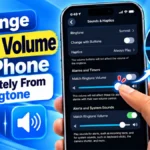
If you have ever lowered your iPhone's ringtone volume at night only to worry that your morning alarm would also become too quiet, iOS 27 has a useful solution.Apple has added separate volume controls for alarms and timers and for alerts and system sounds. This means you no longer have to keep your alarm volume tied to your ringtone volume.For example, you can keep your ringtone at a low level while setting your alarm loud enough to wake you up. The setting takes only a few seconds to … [Read more...]
How to Take a Photo From a Video on iPhone | iOS 27

Have you ever recorded a video on your iPhone and later realized that one particular moment would have made a great photo?Maybe someone smiled at exactly the right moment, you captured a beautiful scene while travelling, or you recorded something that happened too quickly to photograph separately.Until recently, the easiest solution was to pause the video, take a screenshot and crop the image afterward.iOS 27 makes this much easier.The Photos app now includes a Save Video Frame … [Read more...]
How to Remove the Microphone Button from Messages on iPhone

Have you ever been typing a message on your iPhone, moved your finger toward the right side of the text box and accidentally activated the microphone or audio control?It can be surprisingly annoying. Instead of continuing to type, your iPhone may start an audio recording or activate Dictation. If you rarely send voice messages, that button can feel like it is simply taking up space and waiting for an accidental tap.The good news is that iPhone users can now choose what appears in … [Read more...]
How to Separate Front and Rear Dashcam Videos on PC Without Selecting Files One by One

If you use a front and rear dashcam, you may have noticed that the recordings from both cameras are stored together on the microSD card. When you copy the footage to your Windows PC, finding only the front camera videos or only the rear camera videos can become a tedious job.For example, VIOFO dashcams commonly use file names ending in F for the front camera and R for the rear camera. Depending on the model, you may see files such as: 20240101_120000_F.mp4 and … [Read more...]
Play Store Settings to Turn Off for a Faster Android Phone

If your Android phone has become slow, heats up while using apps, or the battery drains faster than before, you're not alone. Millions of users search Google every month for terms like "How to speed up Android phone," "Play Store settings to turn off," "Android battery drain fix," and "Why is my phone slow?"Most people think Google Play Store is only used to download apps. However, the Play Store continuously works in the background. It checks for app updates, scans installed apps for … [Read more...]
- 1
- 2
- 3
- …
- 21
- Next Page »