Has SBI sent you an SMS asking you to update your KYC? Don’t worry—you can now complete the SBI KYC update online without visiting your home branch.
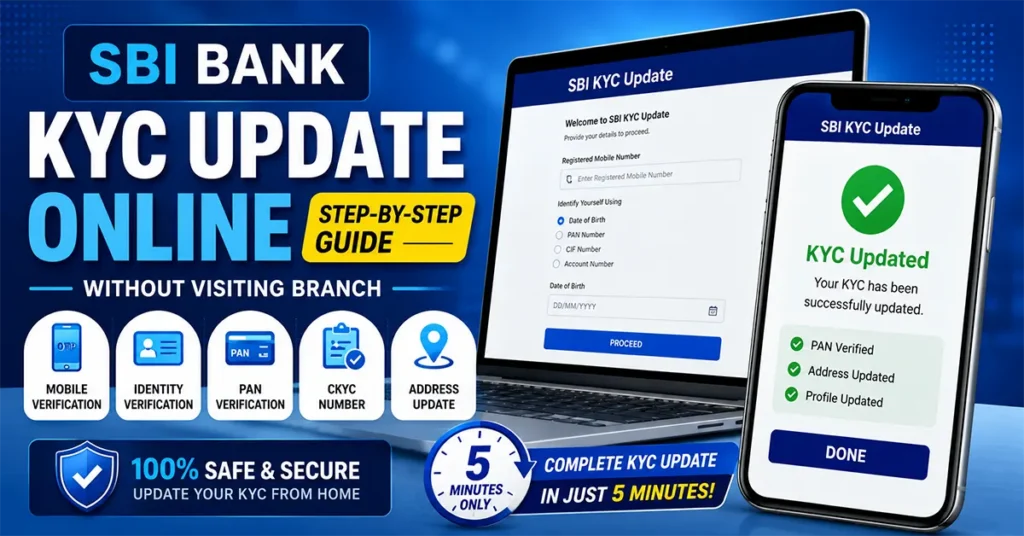
Using the official YONO SBI KYC Update portal, eligible State Bank of India customers can verify their identity, update their address using Aadhaar, and complete the KYC process in just a few minutes.
In this detailed guide, you’ll learn exactly how to update your SBI Bank account KYC online, the documents required, eligibility, and solutions to common problems.
Table of Contents
What is KYC?
KYC (Know Your Customer) is a mandatory identity verification process followed by banks and financial institutions as per the guidelines of the Reserve Bank of India (RBI).
KYC helps banks verify the identity and address of customers to:
- Prevent fraud and identity theft
- Stop money laundering
- Ensure banking records remain updated
- Comply with RBI regulations
- Continue uninterrupted banking services
Banks periodically ask customers to re-submit or update their KYC details.
Why Did SBI Ask You to Update Your KYC?
You may receive an SMS, email, or notification from SBI saying your KYC needs to be updated.
Some common reasons include:
- Your KYC validity period has expired.
- Your address has changed.
- Your PAN or Aadhaar details need verification.
- RBI guidelines require periodic KYC updates.
- Your customer profile is incomplete.
Instead of visiting the bank, eligible customers can complete the entire process online.
Can SBI KYC Be Updated Online?
Yes. State Bank of India allows eligible customers to complete their KYC update online through the official YONO SBI KYC Update portal.
The online process includes:
- Mobile OTP verification
- Customer identity verification
- PAN verification
- Aadhaar authentication
- Address update (if required)
- Profile detail confirmation
Things Required Before Starting SBI KYC Update
Keep the following ready:
- Registered mobile number linked with SBI account
- PAN Card
- Aadhaar Card (or Aadhaar VID)
- Internet connection
- CKYC Number (if available)
How to Update SBI KYC Online
Open Google and search for YONO SBI KYC Update
Open the official KYC Update – YONO SBI website.
Enter the mobile number registered with your SBI account.
You can identify yourself using any one of these options:
- Date of Birth
- PAN Number
- CIF Number
- Account Number
Select your preferred option and enter the required details.
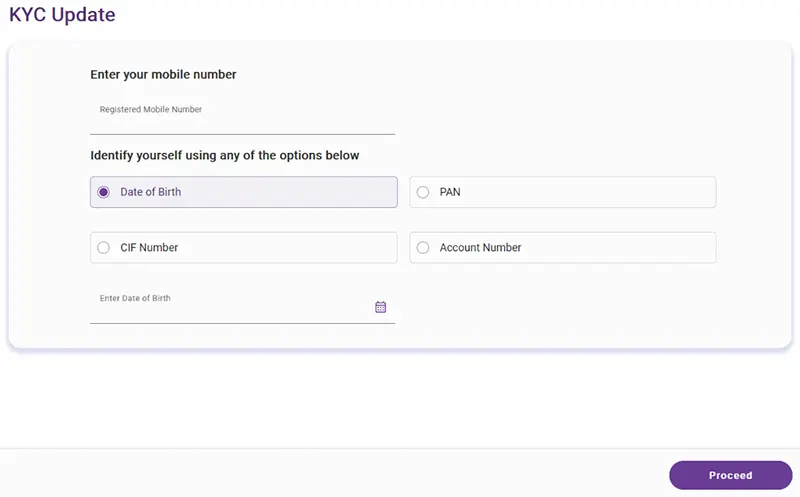
Click Proceed.
An OTP will be sent to your registered mobile number.
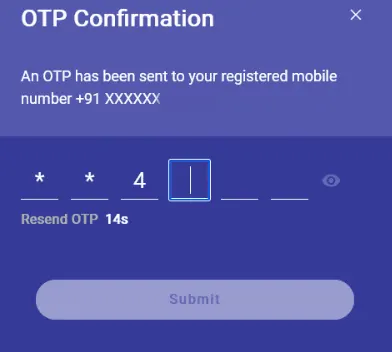
Enter the OTP and click Submit.
Once verified, you’ll be redirected to the Personal Details page.
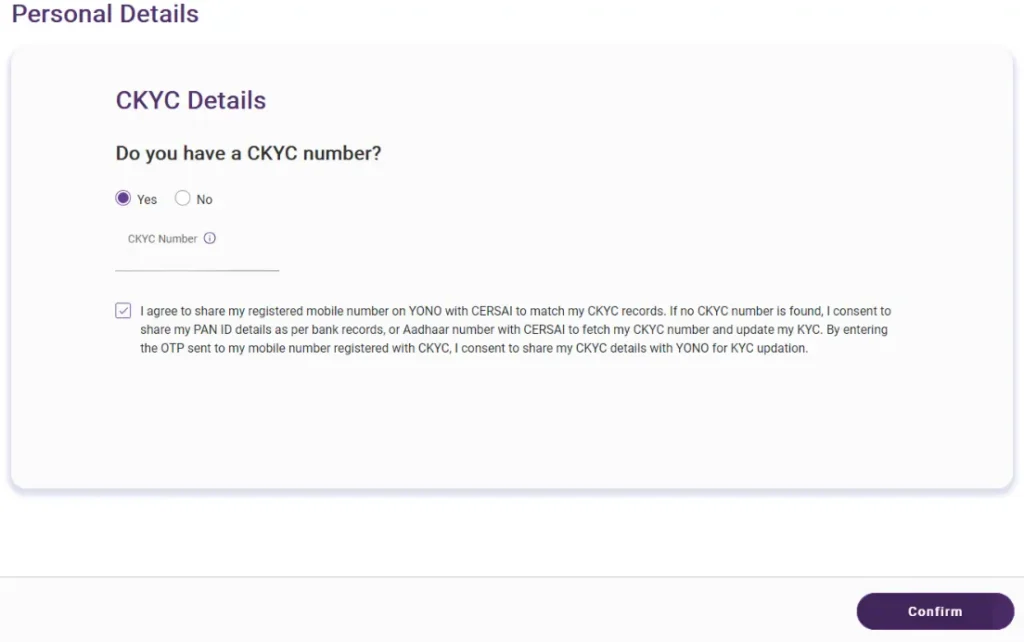
What is CKYC? The next page asks whether you have a CKYC Number. CKYC stands for Central Know Your Customer. It is a centralized repository that stores KYC records of customers. Its purpose is to eliminate the need for customers to submit KYC documents every time they open an account with a new financial institution.
If you already know your CKYC Number:
- Select Yes
- Enter the CKYC Number
If you don’t remember it, SBI displays a helpline number that you can contact to retrieve your CKYC Number.
After entering the details Tick I Agree and Click Confirm
A second OTP will be sent to your registered mobile number.
Enter the OTP and click Submit.
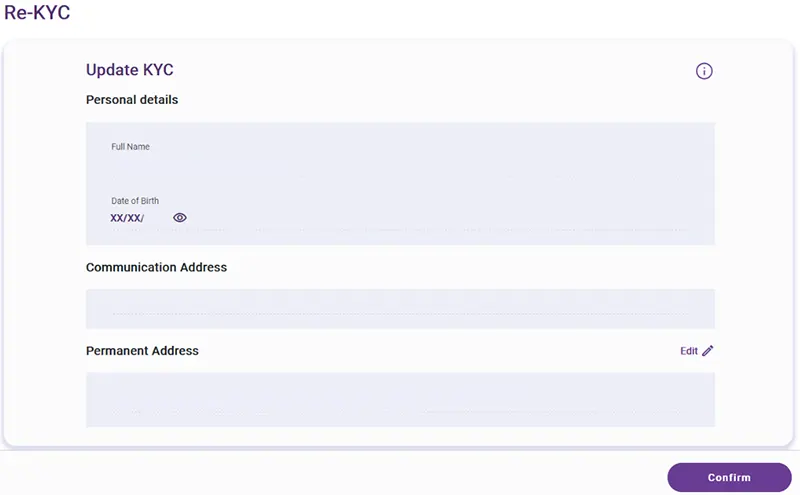
Now SBI will display your:
- Full Name
- Date of Birth
- Communication Address
- Permanent Address
Review all details carefully.
If your address needs correction, click Edit beside the address.
Otherwise, click Confirm.
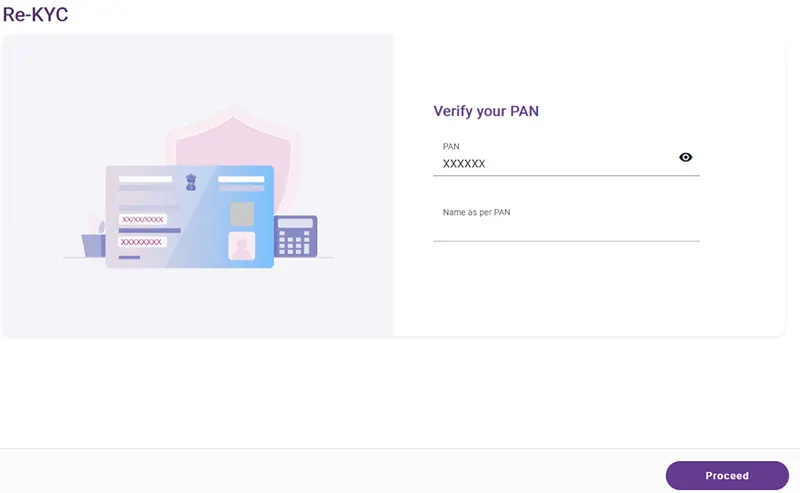
The next page displays your PAN Number.
Enter your Name exactly as printed on your PAN Card.
Click Proceed.
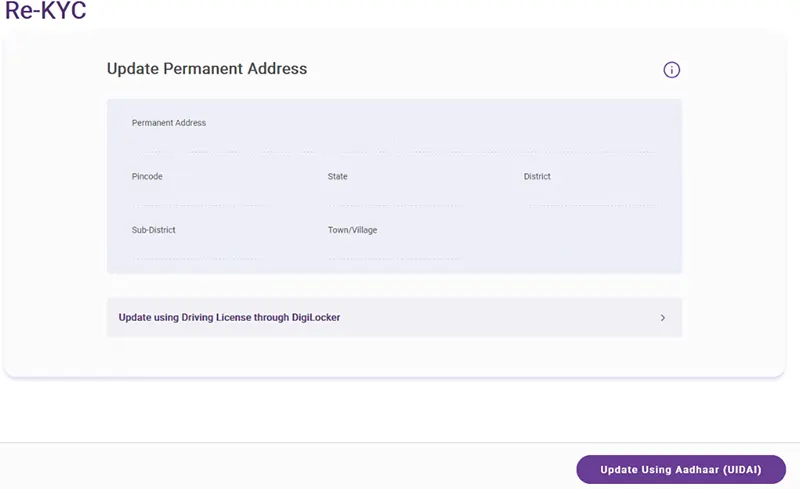
You can update your Permanent Address using either:
- Driving Licence (via DigiLocker)
- Aadhaar (UIDAI)
In this tutorial, we’ll continue using Update using Aadhaar (UIDAI).
Select the option and click Proceed.
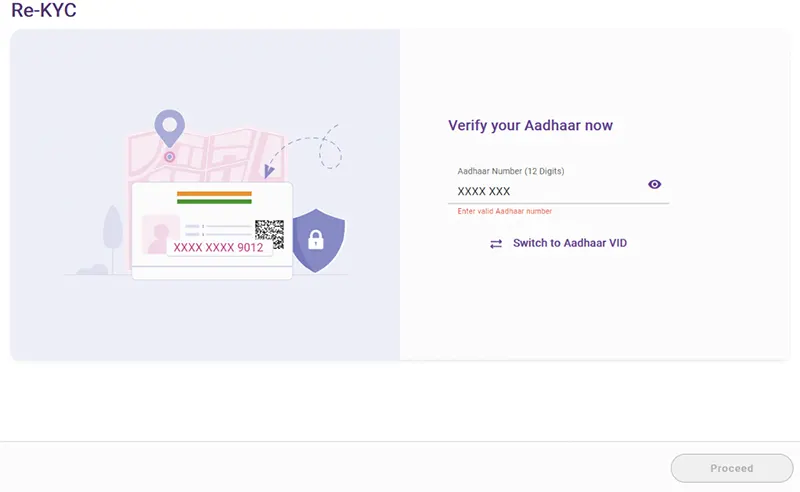
Enter either: Aadhaar Number or Aadhaar Virtual ID (VID)
Click Proceed.
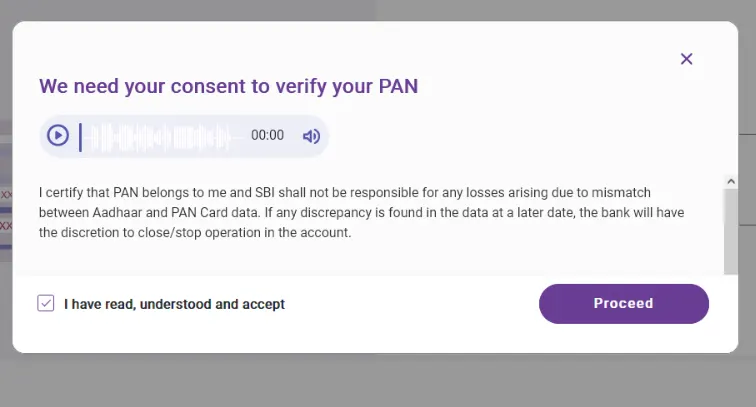
SBI will display an Aadhaar verification consent page.
Read the consent carefully.
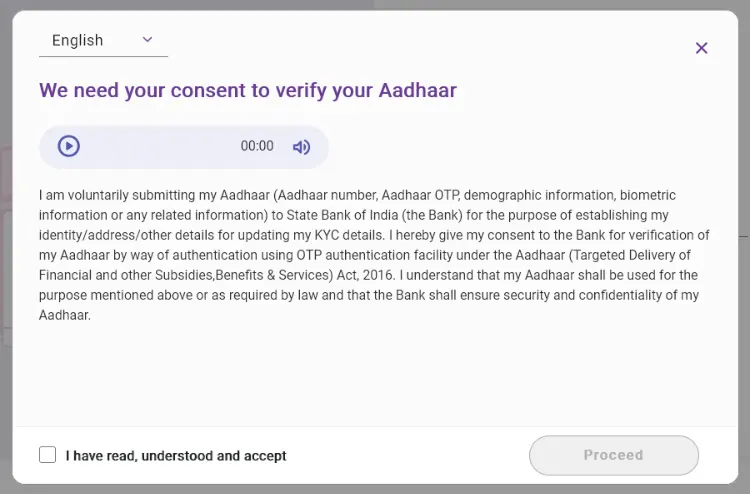
You can also use the audio option to hear the consent.
Tick the checkbox confirming that you have read and accepted the consent.
Click Proceed.
An OTP will be sent to the mobile number linked with your Aadhaar.
Enter the OTP and Click Submit.
Your Aadhaar will now be successfully verified.
Review your Permanent Address.
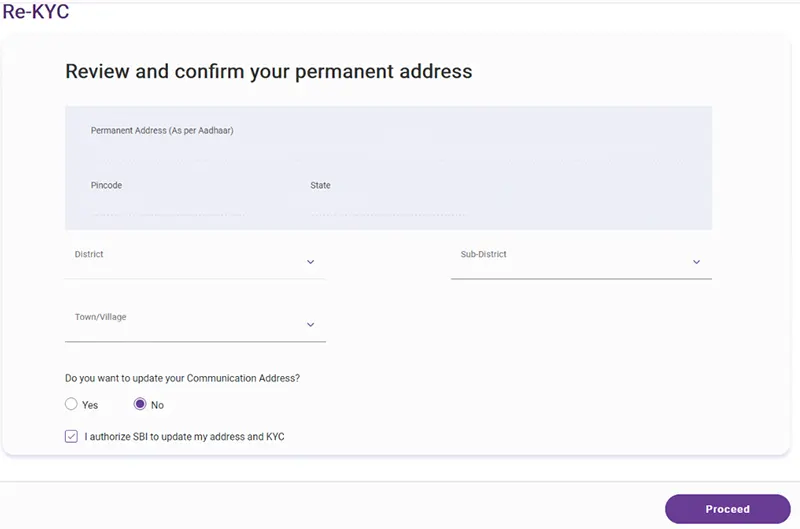
If required, select: Sub-District and Town/Village
You will also be asked whether you want to update your Communication Address.
Choose: Yes or No
Tick the checkbox authorizing SBI to update your address and KYC details.
Click Proceed.
SBI will now display your profile information.
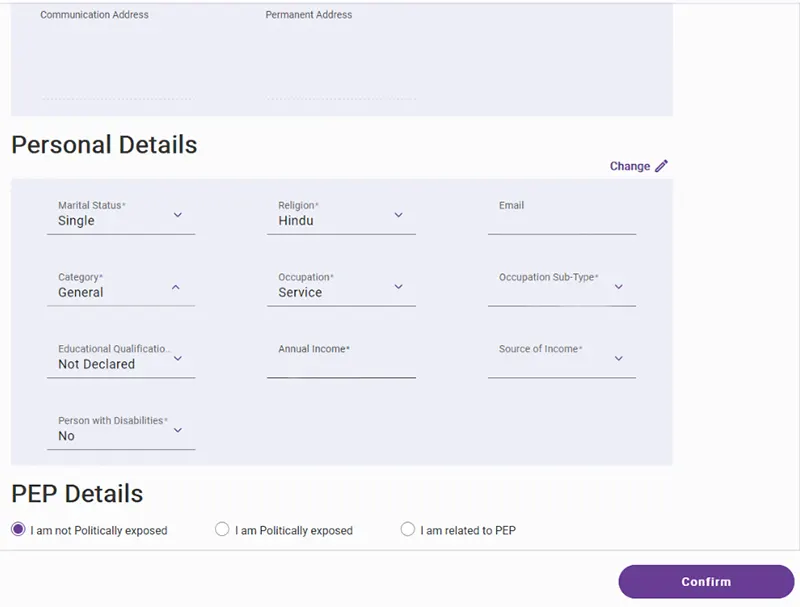
Some fields may require you to choose values, such as:
- Religion
- Category
- Occupation
Select the appropriate details.
Tick the checkbox authorizing SBI to update your KYC and profile.
Click Confirm.
One final OTP will be sent.
Enter the OTP and Click Submit.
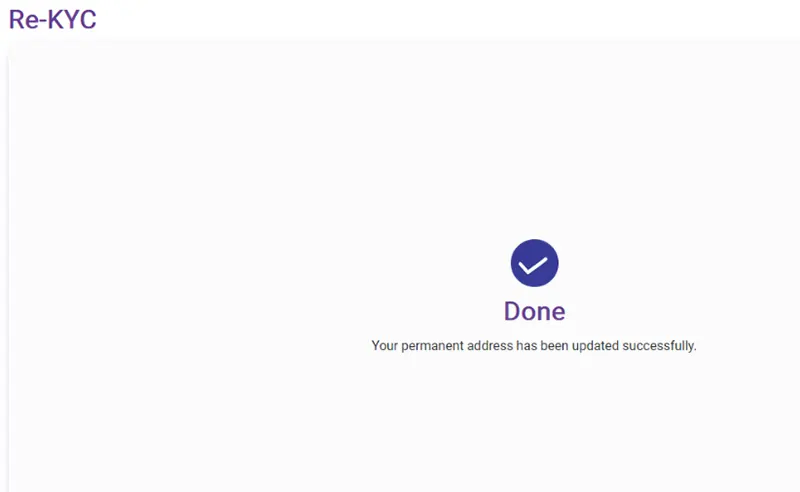
Congratulations! Your SBI KYC update has now been completed successfully.
How to Check Whether SBI KYC Is Updated
After completing the process:
Log in to SBI Internet Banking or YONO SBI.
Open your Profile section.
If your KYC has been updated successfully, you’ll see the KYC Updated status.
You may also receive a confirmation SMS from SBI.
Benefits of Updating SBI KYC Online
Updating your KYC online offers several advantages:
- No need to visit the SBI branch
- Complete the process from home
- Secure Aadhaar verification
- Instant OTP authentication
- Quick profile update
- Saves time and paperwork
Updating your SBI KYC online is a quick, secure, and convenient process that can save you a trip to the bank. If you’ve received a KYC reminder from SBI, simply use the official YONO SBI KYC Update portal to verify your identity, confirm your PAN and Aadhaar details, review your profile, and complete the update in just a few minutes.
Always use only the official SBI website to complete your KYC, and never share OTPs or banking credentials with anyone. Once the process is complete, check your SBI profile to confirm that your KYC status has been successfully updated.
If you found this guide helpful, feel free to share it with family and friends who may also need to update their SBI KYC online.
Yes. SBI does not charge any fee for updating your KYC online.
Yes. Eligible customers can complete the KYC update online using the official YONO SBI KYC Update portal.

Leave a Reply