While calling any of the contacts from your contact list, does your Android phone initiate the call without asking you to select a SIM? If yes, then this guide provides the correct solution to your problem, and it works on almost all Android phone brands, especially on dual-SIM devices.
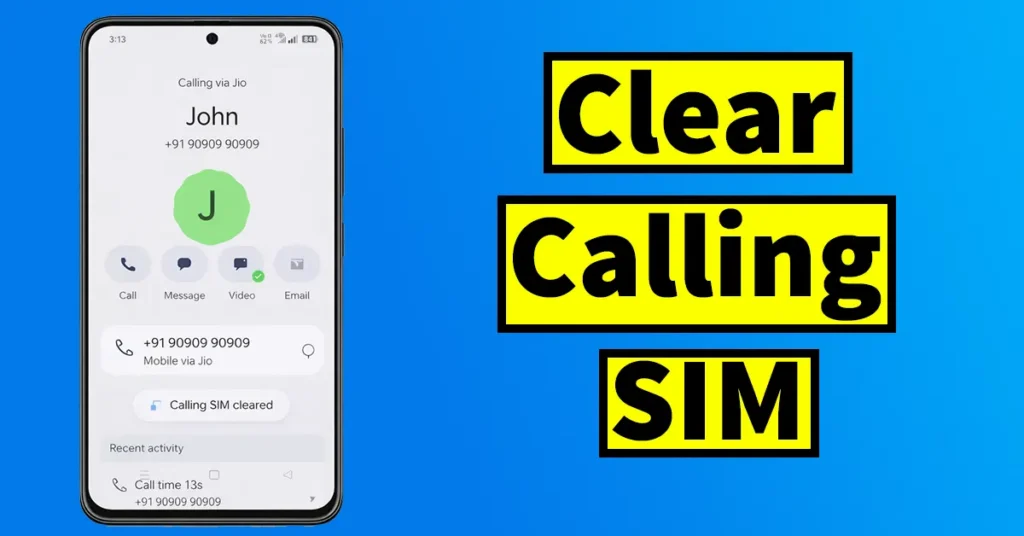
As an Android user, this is a very common issue faced by many users. In this situation, some contacts from your contact list do not prompt you to choose a SIM card while making a call. Instead, the phone directly places the call using one SIM automatically. This often leads users to wonder whether this behavior is caused by a software bug, a virus, or even unauthorized access to their phone.
In reality, this problem is commonly faced by elderly users or people who do not have in-depth knowledge of smartphone settings and features. While making a call, they may unknowingly tap on the “Remember this choice” option and select a SIM. Since they are not aware of the consequences, the phone starts calling automatically from the same SIM every time. As a result, they may end up facing this issue repeatedly and often need to approach their children or family members to fix the problem again and again.
The good news is that this is not a bug, virus, or hacking issue. It is actually a feature built into Android.
Table of Contents
Why This Happens on Android Phones
When you make a call on a dual-SIM Android phone, the phone usually asks you to choose which SIM to use for that call. On the SIM selection popup screen, there is an option labeled “Remember this Choice SIM Preference is Saved with your Contacts” (or something similar, depending on the phone brand).
If, by mistake or unintentionally, you select or tick the “Remember this choice” option and then choose a SIM card to make the call, Android saves this SIM preference for that specific contact.
From that moment onwards:
- Whenever you call that particular contact, your phone will no longer ask you to select a SIM
- The call will be automatically placed using the previously selected SIM
- The SIM selection option will be skipped entirely for that contact
This means the SIM preference has been permanently saved for that contact unless you manually clear it or remove sim preference for a contact.
Why Changing SIM During a Call Is Not a Proper Solution
Although Android provides a temporary workaround where you can:
Make a call using the default SIM
Tap on More options during the call
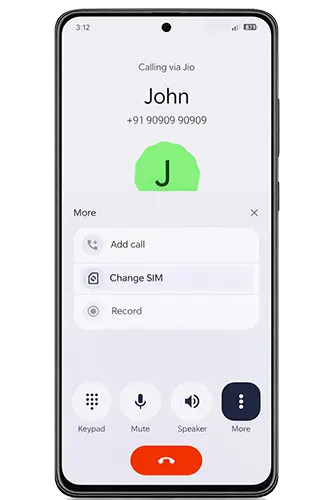
Select Change SIM and switch to the other SIM
This method is not convenient, especially for elderly users, and it is not a permanent solution. Every time the contact is called, the same issue will occur again. Therefore, the correct approach is to clear the calling SIM preference set for that specific contact.
How to Clear Calling SIM Preference on Android
Follow the steps below carefully to clear the calling SIM preference for a contact:
Open the Contacts app on your Android phone
Scroll through your contact list and select the contact for which the calling SIM preference has been saved
Once the contact opens, you will see the contact details screen
Locate the phone number associated with that contact
Long-press on the phone number
A list of options will appear on the screen
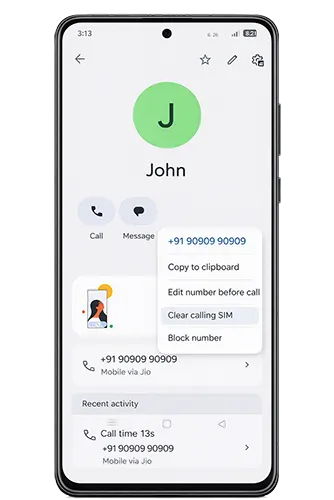
From the available options, tap on Clear Calling SIM (the wording may vary slightly depending on the phone brand)
This action will remove the SIM preference saved for that contact
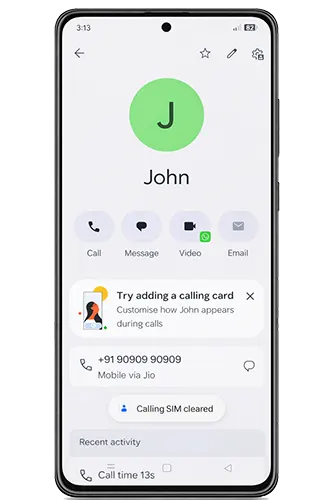
After completing these steps, the calling SIM preference for that specific contact will be successfully cleared.
Once the SIM preference is cleared The next time you try to call that contact, your phone will again prompt you to select a SIM.
You will see the SIM selection popup as expected
Make sure that this time you do not select the “Remember this choice” option. If it is selected again, the SIM preference will once more be saved for that contact, and you will need to repeat the same steps to clear it again.

Leave a Reply