• Home
  • About
  • Contact Us
  • Privacy Policy

Reveal That

Powered by Technology & Internet

  • Internet & Online Tools
  • Computer / Tech Tutorials
  • Tools
    • Case Converter Upper Lower Title Sentence Caps
    • HEIC to JPEG
    • Car Android Boot Logo Generator
    • Viofo Dashcam Video Combiner
    • Viofo Dashcam Organizer

How to See Recently Deleted Messages on iPhone

Written by:
Vjay
Published on:
June 5, 2025
Thoughts:
No comments yet

Whether you deleted a message accidentally or intentionally on your iPhone, if you need those deleted messages later, here’s how you can recover them. On an iPhone, you can actually access or view deleted messages — a feature that can be very useful when needed. So, let’s explore how to see recently deleted messages on an iPhone.
See Recently Deleted Messages on iPhone

See Recently Deleted Messages on iPhone

To see recently deleted messages on your iPhone, you don’t need to install any additional applications or message recovery apps. The feature to recover deleted messages is built right into iOS.

Follow these steps to access recently deleted messages on iPhone:

Open the Messages app.
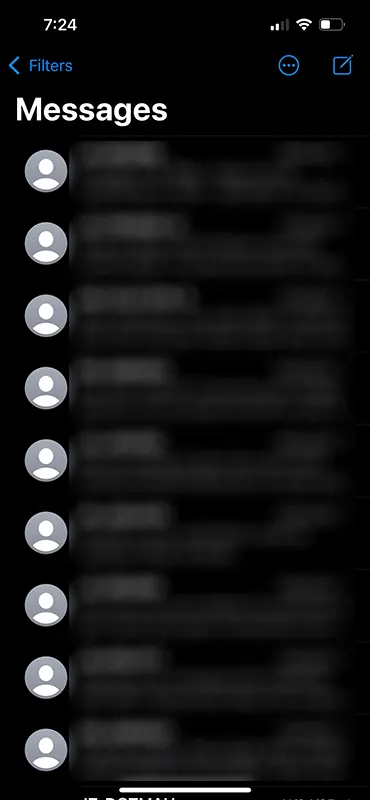
iPhone Messages

In the Messages section, tap on Filters in the top-left corner.
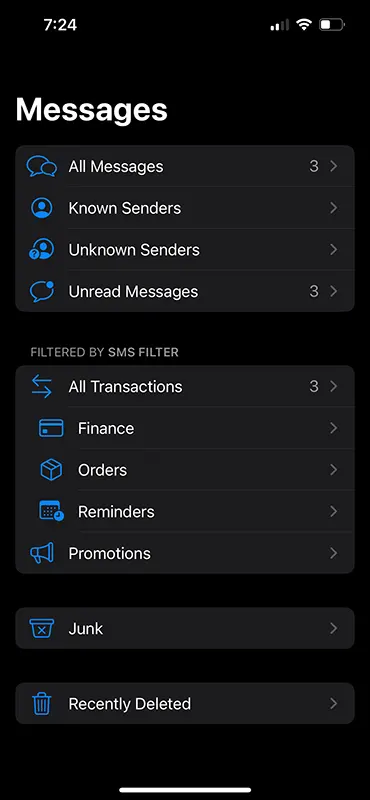
Messages Filters

The Filters option will take you to the message categories page.

From the Messages Filter page, tap on Recently Deleted.
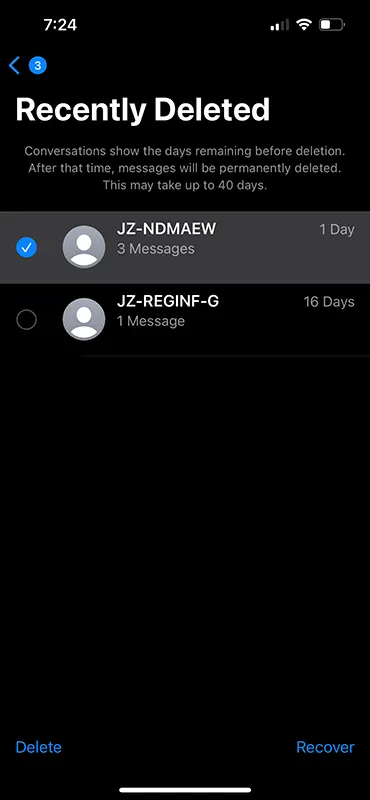
iPhone Recently Deleted Messages

The Recently Deleted page will display all the messages you have recently deleted.

Recover Disappeared Notes from iPhone

To recover a message, tap on it, then tap the Recover button at the bottom.
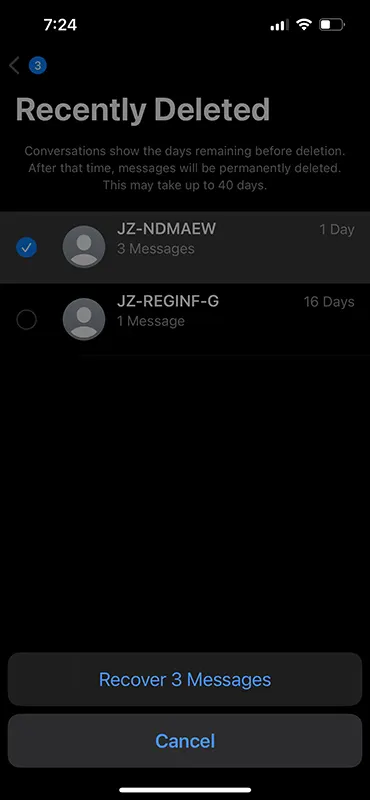
iPhone Recover Messages

A pop-up will appear — tap on Recover Messages.

The message will disappear from the Recently Deleted section and reappear in the All Messages section.

You can now open the message from All Messages and read its contents.

That’s how simple it is to access deleted messages on an iPhone!

Join us on Telegram

Categories: Mobile & Smartphone

About Vjay

Vijay is the founder of RevealThat.com, sharing practical and easy-to-understand content on technology and internet-related topics since 2015. His work focuses on real-world solutions that help users make better use of technology. Connect via the Contact Us page.

Leave a Reply Cancel reply

Your email address will not be published. Required fields are marked *

fifteen + four =

RECENT POSTS

How to Verify Signature in Aadhaar | Fix Signature Not Verified & Validity Unknown (PC & Mobile)

How to Update SBI KYC Online in 2026 (Step-by-Step Guide Without Visiting Branch)

How to Cancel ICICI Card Standing Instructions (Auto Debit) Online for Credit & Debit Card

How to Apply and Download a Digitally Signed Survey Plan Online in Goa

How to Convert a Picture to PDF on iPhone Without Any App

NYT Sudoku Answers Today: Easy, Medium & Hard Solutions

Amazon Quiz Answers Today: FunZone Quiz Answers

NYT Connections Answers Today: Hints & Solutions

Wordle Today Answer: Hints & Solution

Spelling Bee Answers Today: Hints, Pangram & Solutions

© 2026 · RevealThat.com · Sitemap · All trademarks & logos belongs to their respective owners

Jai Mata Di

ॐ ऐं ह्रीं क्लीं चामुण्डायै विच्चे|